Using slow disk with Camunda


In today's Chaos Day, we wanted to experiment with slow disks, as we have recently run into some incidents related to that. We want to understand and document how Camunda behaves in such scenarios.
We have two main experiments planned: one for primary storage and one for secondary storage (in this case, Elasticsearch) using slow disks.
TL;DR; Using HDDs instead of SSDs on Camunda's primary storage caused around 50% throughput degradation — not because of lower disk throughput, but because of higher latency, which directly stalls Raft replication and commit acknowledgement. Moving the slow disk to Elasticsearch (secondary storage) was even worse, dropping throughput by ~70% and accumulating a permanent export backlog of ~200k records, with memory growing from unexported in-flight data. Both experiments confirm that SSDs are essential for both storage layers, and our documentation for secondary storage needs to be updated to reflect this.
Chaos experiment: Slow disk on primary storage
We have certain recommendations for disk types in our documentation, especially using SSDs, high-throughput, low-latency disks, as Camunda is an IO-intensive application. What we miss in our documentation is actually showing why this is important.
In this experiment, we want to understand how the Camunda cluster behaves when the primary storage disks are slow. How does this affect the cluster's performance and availability?
We plan to set up a realistic load test using a Camunda cluster with a standard hard disk for primary storage.
Expected
We only support SSDs, as Camunda is generally IO-intensive, and we expect that using slower disks will degrade performance. We expect the system to become unresponsive, leading to timeouts and increased request processing latency.
Actual
As we run our tests and set up in GCP, we use the standard hard disks that GCP provides.
GCP persistent disk types: The standard storage class maps to the pd-standard GCP disk type:
$ k get storageclasses.storage.k8s.io standard -o yaml
apiVersion: storage.k8s.io/v1
kind: StorageClass
metadata:
  name: standard
allowVolumeExpansion: true
provisioner: kubernetes.io/gce-pd
reclaimPolicy: Delete
volumeBindingMode: Immediate
parameters:
  type: pd-standard
We were setting up a realistic load test using the c8-chaos-25-pd-standard namespace, and we are using the 8.9.9 image as the last stable release. We have configured the cluster to use standard hard disks for the primary storage.
orchestration:
  ## @param core.pvcStorageClassName can be used to set the storage class name which should be used by the persistent volume claim.
  # It is recommended to use a storage class, which is backed with a SSD. Set to "-" to disable use of default storage class.
-  pvcStorageClassName: benchmark-ssd-zonal-v1
+  pvcStorageClassName: standard
We will compare this test with our 8.9.x release tests that use SSDs to see the difference in performance and availability.
At the beginning of the test, the throughput looked promising, but after about 30 minutes, we saw a significant drop in throughput, and latency increased. Compared to the same test with SSDs, we see a significant performance degradation of around 50%.
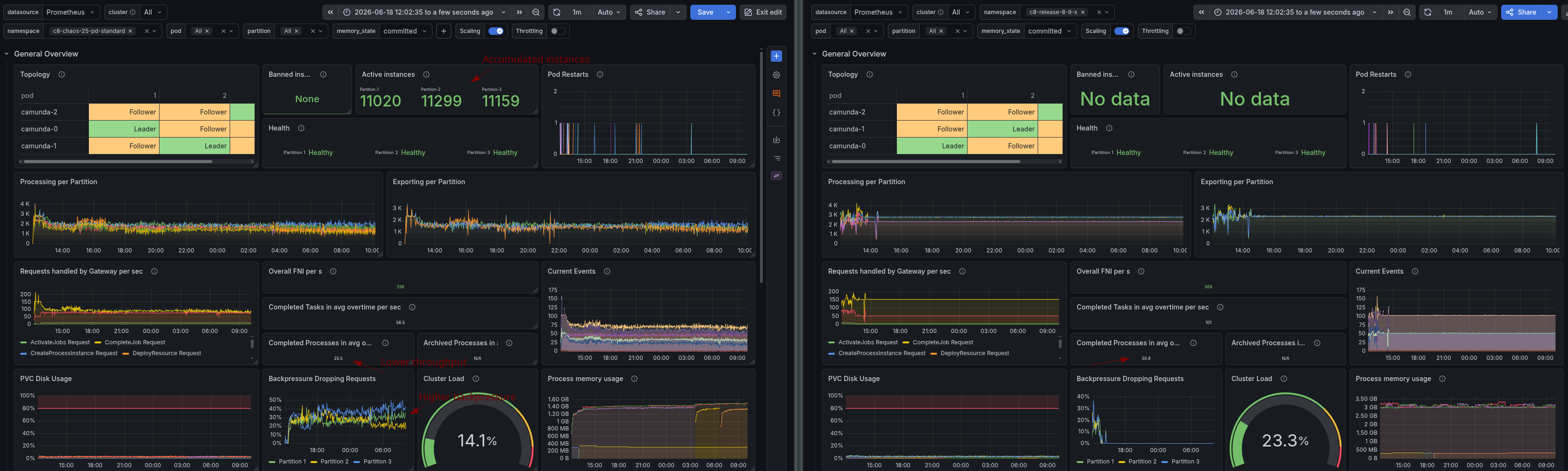
We can see in the release test for 8.9 that at the start it struggled as well, because some load test applications restarted, but later it ran stably at ~51 PI/s and ~101 Tasks per second, while the test with standard disks ran at ~25 PI/s and ~58 Tasks per second.
It is interesting to note that, based on GCP documentation, the disk throughput looks similar. Some might wonder what the difference is here and why we need to use SSDs. The difference is that the standard disks have a much higher latency, which can cause significant performance degradation for an IO-intensive application like Camunda. This is not well documented in hyperscalers like this.

This can be especially seen in the record write and commit latencies.

These latencies have a significant impact on the cluster's overall performance. As a leader, one needs to replicate and commit to a command before it is allowed to process and respond to it. A follower needs to write and flush such before it can acknowledge the replication to the leader.

This means that the disk's latency directly impacts request processing latency and can cause significant performance degradation, as we also see in the metrics.
Using slower disks not only affects overall processing performance but also disrupts the underlying RAFT cluster.
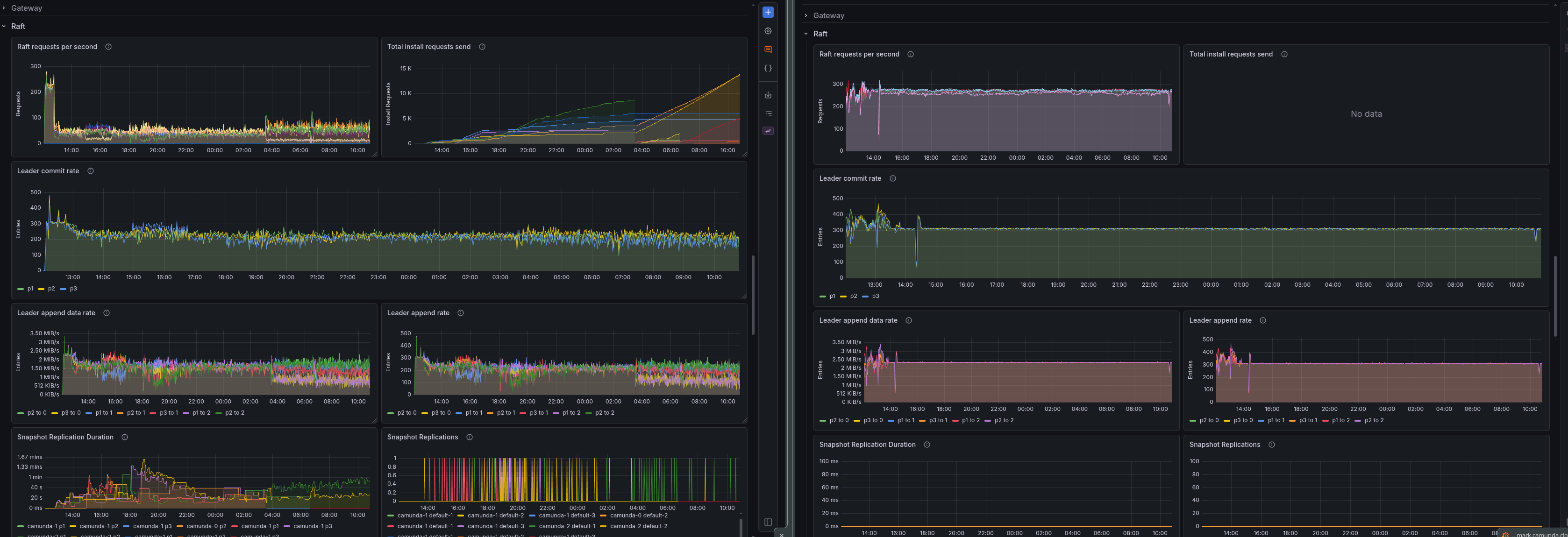

If followers are slow, they lag behind the leader even more than they would naturally, which is already the case, and this will cause snapshot replications. Depending on disk latency, this could even cause more severe issues, such as retry loops on append operations. Depending on the state size (snapshot size), this could put additional load on the network.
Conclusion
We were able to demonstrate the negative impact that slow disks can have. We were able to reproduce significant performance degradation and increased latency when using simple HDDs. With this, it is visible that not only disk throughput is important, but also disk latency.
This is why we recommend using SSDs for the primary storage in Camunda clusters, as they significantly improve performance and availability. We have opened a documentation PR to better explain this requirement in our sizing guide.
Chaos experiment: Slow disk on secondary storage
Similar to the first experiment, we want to understand how the Camunda cluster behaves when we use a slower disk for the secondary storage. In this case, we will use Elasticsearch as the secondary storage.
As part of our documentation, we recommend using SSDs for Camunda (primary storage), but we do not have a specific recommendation for secondary storage in the reference architecture or sizing guides.
Expected
In general, it must be clear that if secondary storage is not performing well, it will negatively impact Camunda. We have covered this in related posts such as Elastic restart impact on Camunda, Resiliency against ELS unavailability, and Performance of Camunda Platform without Secondary Storage.
Actual
Setup follows a similar pattern as above, but we will use a slower disk for the Elasticsearch nodes. We will compare this test with our 8.9.x release tests that use SSDs to see the difference in performance and availability.
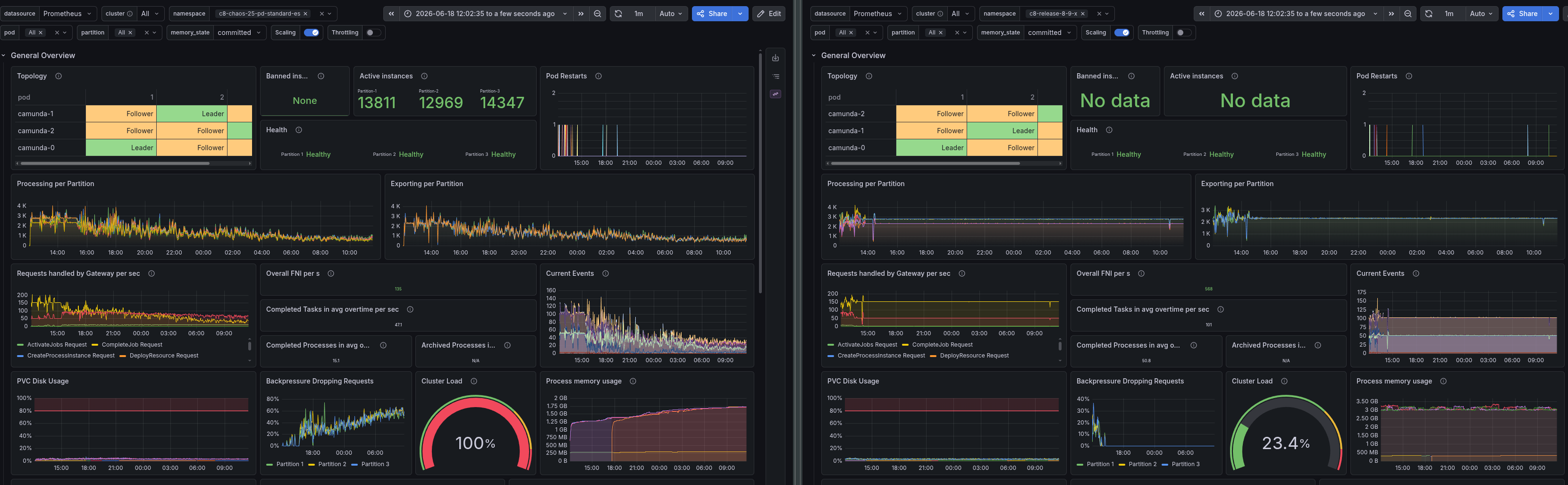
The cluster's performance is even worse than in the first experiment, with a significant drop in throughput and increased latency. We see that the performance is around 15.1 PI/s and 47.1 Tasks per second, which is a significant degradation compared to the test with SSDs.
The backpressure is also significantly higher, as in the first experiment, which indicates that the cluster is struggling to keep up with the load. The backpressure is tightly coupled with the exporting backlog, which would explain this. We have a constant backlog of ~200k records that are not exported.
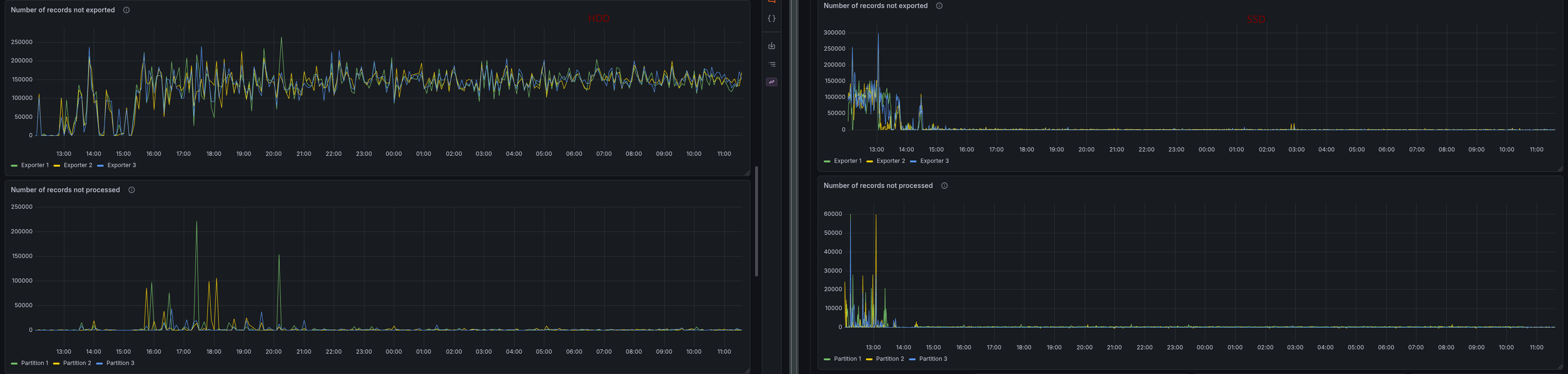
Obviously, this affects the data availability measurement and reaches its maximum value.

We can see in the exporter metrics that flushes to Elasticsearch now have much higher latency.


Flush duration can reach 8-10 seconds.
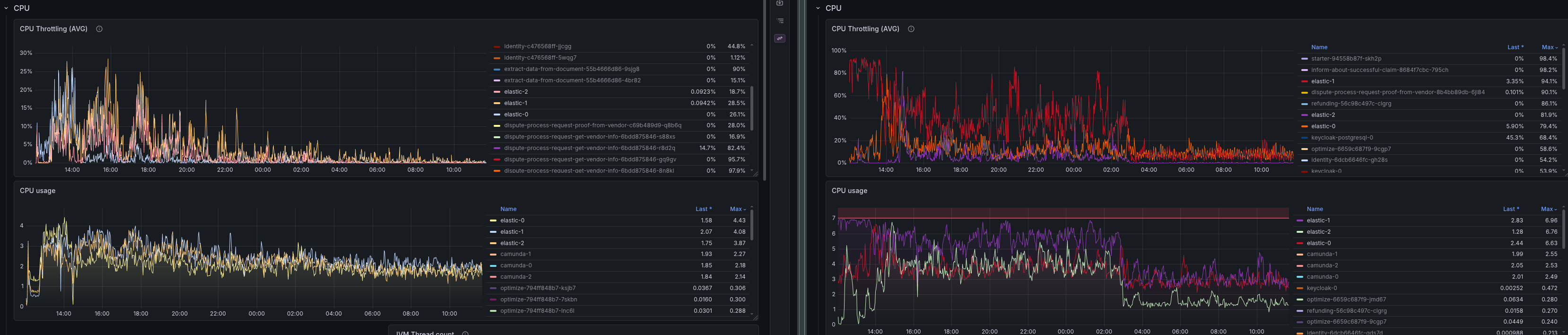
In CPU metrics, we wouldn't see anything in this case, as the cluster isn't able to process as many requests (i.e., it's not handling the same throughput), and the CPU isn't fully utilized.
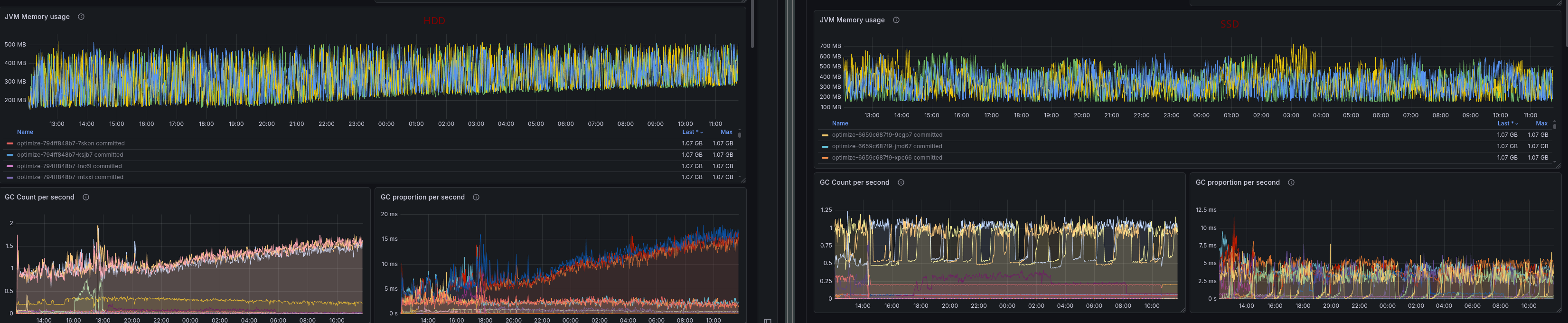
It is interesting that Camunda's memory usage (and GC activity) increases when using HDD for secondary storage. This is likely the case because the in-flight records are not exported, and we keep them in memory.
Looking at the Elasticsearch metrics and dashboard (provided by Prometheus) we couldn't see a reason why it would perform worse. Something we should keep in mind is that most metrics here are related to throughput, not latency (which is the reason for the performance degradation).
Conclusion
We were able to show that using slower disks, such as HDDs, for secondary storage can have a significant negative impact on the Camunda cluster's performance as well. It is even worse than using slower disks for the primary storage.
This is why we should also recommend using SSDs for secondary storage in Camunda clusters, as they significantly improve performance and availability. We have opened a documentation PR to reflect this in our sizing guide and reference architecture.
Overall
Both experiments show that disk latency — not throughput — is the critical factor for Camunda's performance, and that this applies to both storage layers. Slow primary storage degraded throughput by ~50% by stalling Raft replication; slow secondary storage was even more damaging, cutting throughput by ~70% and causing memory growth from unexported in-flight records. SSDs are a hard prerequisite for stable, predictable operation at both layers, and our documentation should make this explicit for secondary storage as clearly as it already does for primary storage.