Christopher Kujawa
Principal Software Engineer @ Camunda
View all authors

Confirming Optimize's Object Variable Flattening Cost With a Controlled A/B Test

· 15 min read
Christopher Kujawa
Principal Software Engineer @ Camunda

In a previous Chaos Day and its variable-filtering follow-up, we measured Optimize's Elasticsearch overhead against Self-Managed load tests. Running the same kind of test against a Camunda SaaS cluster turned up something we didn't expect: Optimize's disk footprint there looks nothing like what we'd measured on Self-Managed. This Chaos Day traces that discovery to its root cause and confirms it through a controlled experiment.

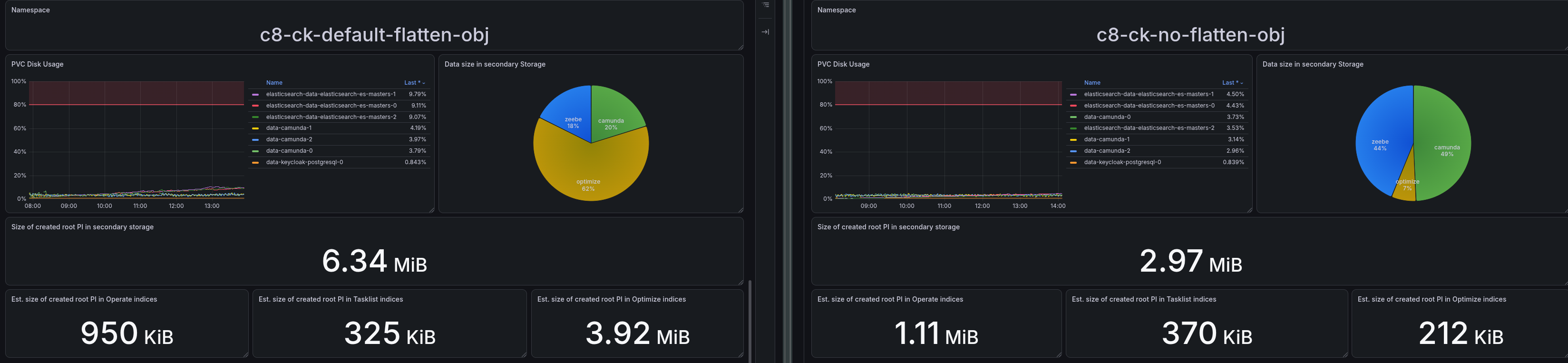
TL;DR; A week-long test against a SaaS Advanced 4x cluster showed Optimize's indices taking up only ~7-10% of total Elasticsearch disk, versus ~59-100% on our Self-Managed weekly load test running the exact same workload. The cause: Optimize's includeObjectVariableValue flag (env CAMUNDA_OPTIMIZE_ZEEBE_INCLUDE_OBJECT_VARIABLE) defaults to true and flattens every JSON object variable into one stored variable per property, plus the raw serialized object itself. Camunda SaaS explicitly disables this; the public Self-Managed Helm chart does not, so any Self-Managed deployment that hasn't touched this setting silently pays for it. We confirmed this with an isolated A/B test that changes only this one flag: Optimize's ES disk share dropped from 62.8% to 7.6%, an 8.3x reduction, for the same workload. The number that matters most for capacity planning: total secondary storage per root process instance dropped from 6.34 MB to 2.97 MB, a 2.13x reduction. This ratio is specific to our payload's shape: flattening recurses through nested JSON with no depth limit, so a payload with deeper nesting or more object fields can cost considerably more than this.

disk-consumption

Impact of Elasticsearch restarts on Optimize

· 16 min read
Jonathan Ballet
Senior Software Engineer @ Reliability Testing Team
Christopher Kujawa
Principal Software Engineer @ Camunda

In today's Chaos Day, we continued our experiments with Optimize and its behavior with the default configuration, when the underlying Elasticsearch cluster has nodes restarting.

This exercise is the continuation of the recent improvements and clarifications we added to our documentation regarding the configuration, impact and scaling of Camunda clusters running Optimize.

TL;DR;

  1. The default Camunda configuration does not create replica shards for the zeebe-record-* indices, making them unavailable during any Elasticsearch node restart.
  2. Due to how Zeebe routes records using partition IDs (low-cardinality values hashed with Murmur3), some shards end up completely empty while others hold all the data.
  3. When one of the zeebe-record-* indices becomes unavailable, Optimize's single importer thread stalls all other imports — not just the affected resource type — and takes up to 45 minutes to fully recover.

Reducing Optimize's Elasticsearch Overhead: Variable Filtering Strategies Compared

· 13 min read
Christopher Kujawa
Principal Software Engineer @ Camunda

In a previous Chaos Day, we measured what Optimize costs a cluster: at a realistic workload, it drove 3.4x higher Elasticsearch (ES) CPU and ~4x more ES disk than running without it. That post ended with an open question: Can variable handling be tuned to reduce the impact? This Chaos Day answers it.

We ran twelve load tests on Camunda 8.9.9, six variable-filtering configurations, each at both a realistic and a max workload, and compared throughput, CPU, memory, and ES disk usage across all configurations. All twelve started together and ran in parallel on identical infrastructure and the same Helm chart, each started fresh with an empty Elasticsearch, so their footprints are directly comparable.

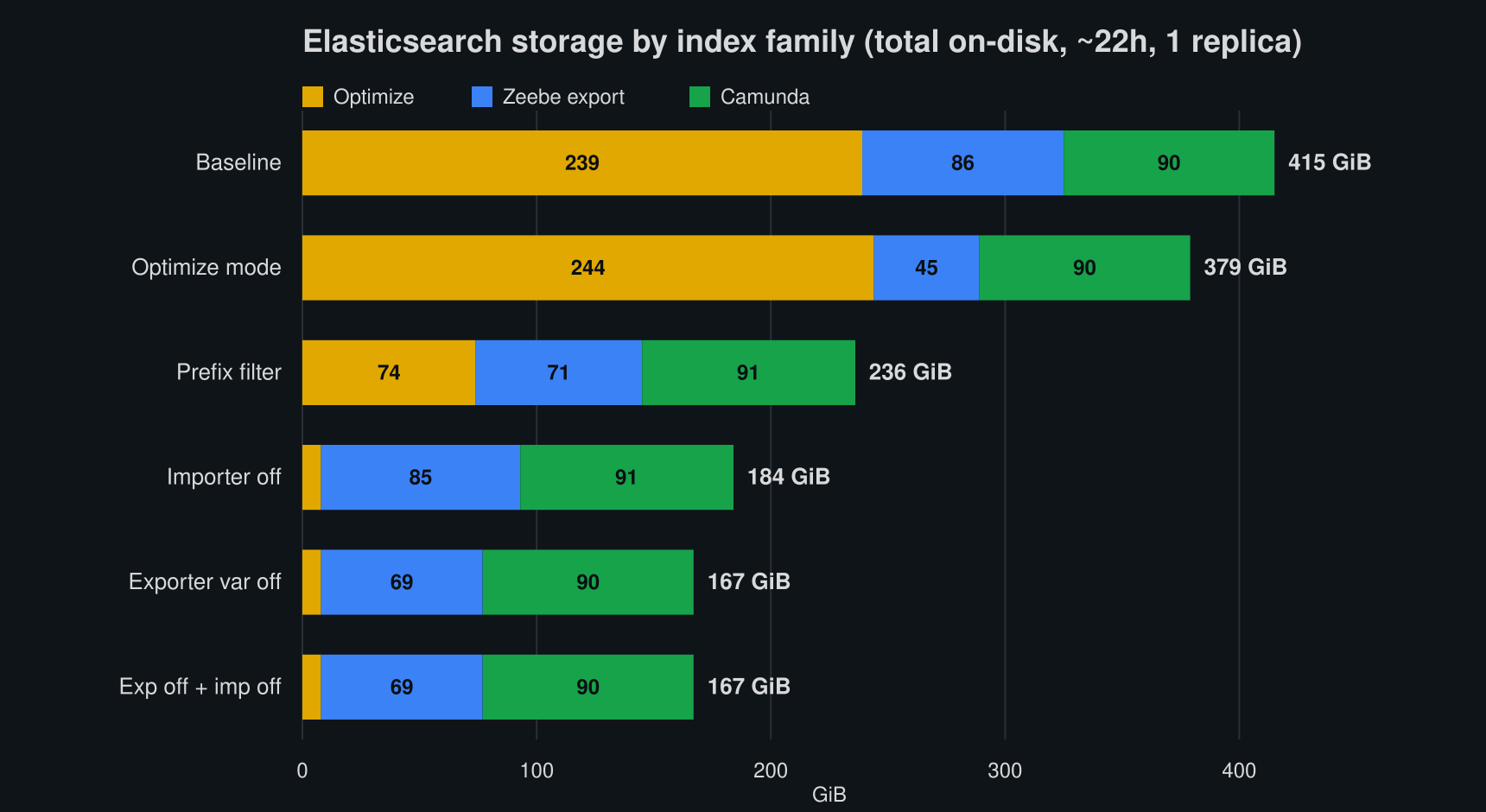
TL;DR; Keeping variables out of Optimize is the big lever. Disabling variable export (index.variable=false) cuts total Elasticsearch storage ~60% and ES CPU ~65% at a realistic load, and recovers ~15-20% throughput at max load. That is enough to give back essentially all the throughput Optimize was shown to cost in the previous Chaos Day, while keeping Optimize running. The surprising part: Optimize stores a variable ~14x more expensively than the raw Zeebe export does (≈29x for high-cardinality string variables), so the cost lives almost entirely in Optimize's imported indices, not in the export. And because in Camunda 8.9 the Elasticsearch exporter feeds only Optimize, this costs you Optimize variable analytics only: Operate and Tasklist (served by the Camunda Exporter) keep their variables untouched.

Elasticsearch storage by index family, per configuration

Using slow disk with Camunda

· 8 min read
Christopher Kujawa
Principal Software Engineer @ Camunda
Jonathan Ballet
Senior Software Engineer @ Reliability Testing Team

In today's Chaos Day, we wanted to experiment with slow disks, as we have recently run into some incidents related to that. We want to understand and document how Camunda behaves in such scenarios.

We have two main experiments planned: one for primary storage and one for secondary storage (in this case, Elasticsearch) using slow disks.

TL;DR; Using HDDs instead of SSDs on Camunda's primary storage caused around 50% throughput degradation — not because of lower disk throughput, but because of higher latency, which directly stalls Raft replication and commit acknowledgement. Moving the slow disk to Elasticsearch (secondary storage) was even worse, dropping throughput by ~70% and accumulating a permanent export backlog of ~200k records, with memory growing from unexported in-flight data. Both experiments confirm that SSDs are essential for both storage layers, and our documentation for secondary storage needs to be updated to reflect this.

Full-disk due to soft-pausing exporters

· 7 min read
Jonathan Ballet
Senior Software Engineer @ Reliability Testing Team
Christopher Kujawa
Principal Software Engineer @ Camunda

On today's Chaos Day, we wanted to experiment with disks filling up due to soft-paused exporters. We have recently encountered some incidents in which these disks filled up. We wanted to understand how Zeebe behaves in such scenarios. We had the following experiment planned: reproducing full disks because exporters are not confirming positions (due to soft-pausing).

TL;DR: We were able to reproduce the full-disk scenario with soft-pausing exporters. The node becomes unresponsive and rejects requests. After unpausing the exporters, we were able to free up disk space again, but it took a while because the exporters needed to re-export all unacknowledged records after the restart. Some interesting learnings from this experiment are that we should not keep exporters soft-paused for long. This can be especially problematic if nodes get restarted. When the disk is full, backpressure still reports zero, but all requests are rejected. Even REST requests are no longer successful.

Impact of Optimize on Cluster Resources and Performance

· 8 min read
Christopher Kujawa
Principal Software Engineer @ Camunda

On this Chaos Day, we measured the impact of Optimize on cluster performance and resource usage. We ran four 2-day load tests on Camunda 8.9.6 — two with Optimize enabled (max and realistic workloads) and two without — and compared throughput, latency, CPU, memory, and disk across all four.

TL;DR; Optimize has a measurable negative impact on throughput under high load (-22% completed PI/s), but the most striking finding is its additional CPU load on Elasticsearch and extra disk footprint at a realistic workload: Elasticsearch CPU was 3.4x higher with Optimize enabled. After two days at a realistic workload, the cluster with Optimize accumulated a maximum of 221.5 GiB of ES data, vs. 61.5 GiB without Optimize, a 3.6x difference. This is a critical finding for customers running Optimize at production scale, as it means that ES resources must be sized to account for Optimize's overhead, even at non-stress workloads.

Impact of High Process Deployments on Elasticsearch

· 6 min read
Pranjal Goyal
Senior Software Engineer @ Reliability Testing Team
Christopher Kujawa
Principal Software Engineer @ Camunda
Jonathan Ballet
Senior Software Engineer @ Reliability Testing Team

On this Chaos Day, we conducted an experiment to observe the impact on Elasticsearch when deploying a large number of process versions to a Camunda cluster, and how that pressure propagates through Optimize, the Zeebe Elasticsearch exporter, and ultimately back to the Camunda engine itself. During recent investigations, we identified a dependency between deployed process models and Elasticsearch shard usage, and wanted to experiment with it to understand what happens when we deploy X process models and where the actual limit lies.

TL;DR; We discovered a 1:1 relationship between Optimize indices and deployed processes, providing a clear, measurable limit on the number of process models that can coexist with Optimize on a given Elasticsearch cluster. Once the Elasticsearch cluster reaches its maximum normal shard limit (default 1000 per node, e.g., 3000 for a 3-node cluster), it stops creating new indices. The Zeebe engine remains unaffected initially, but the failure cascades the next day: once the Zeebe Elasticsearch exporter attempts to create its new dated index, the request is rejected, the exporter stalls, and the Camunda engine hits unrecoverable backpressure. Recovery requires manual intervention (raise cluster.max_shards_per_node, add nodes, or delete indices).

Performance of Camunda Platform without Secondary Storage

· 5 min read
Christopher Kujawa
Principal Software Engineer @ Camunda
Pranjal Goyal
Senior Software Engineer @ Reliability Testing Team
Jonathan Ballet
Senior Software Engineer @ Reliability Testing Team

On this Chaos Day, we conducted an experiment to evaluate the performance of our platform without the use of the secondary storage. The goal was to understand how the system behaves under such conditions and whether and how performance would improve.

TL;DR; We observed that a cluster without secondary storage achieves significantly higher throughput, as it is not throttled by secondary storage and can reach up to 400 PI/s without issues. That is a factor of 1.7x higher than the cluster with secondary storage.

REST API and OIDC

· 9 min read
Christopher Kujawa
Principal Software Engineer @ Camunda
Pranjal Goyal
Senior Software Engineer @ Reliability Testing Team
Jonathan Ballet
Senior Software Engineer @ Reliability Testing Team

Over the past weeks, we have been spending more time improving our load testing and reliability testing coverage. One of the things we did was to enable REST API (by default, we tend to use gRPC).

While doing such, we were experiencing a weird load pattern. This seems to occur when enabling the REST API usage in our load tester clients, together with OIDC.

On today's Chaos day, we want to verify how the system behaves when using the REST API and OIDC together, and how this changes under different loads and versions. We were also validating whether this was related to the cluster configuration (testing with SaaS).

TL;DR; We were seeing recurring throughput drops, especially at higher load (300 PIs), but at lower load they were not visible. The issue was reproducible in 8.8 as well, so it was not related to the changes in 8.9. We couldn't reproduce the pattern in SaaS, as we weren't able to achieve the same load with the small clusters we used. While experimenting, we discovered several areas for improvement. The root cause turned out to be JWT tokens expiring while requests queued in the Apache HttpAsyncClient connection pool. Nic fixed this by moving token injection to after connection acquisition via #50124 🚀

rest-bug

Elastic restart impact on Camunda

· 6 min read
Christopher Kujawa
Principal Software Engineer @ Camunda

In today's Chaos Day, we explored the impact of Elasticsearch availability on Camunda 8.9+ (testing against main).

While we already tested last year the resiliency of our System against ES restarts (see previous post, we have run the OC cluster only. Additionally, certain configurations have been improved (default replica configurations, etc.).

This time, we wanted to see how the system behaves with OC + ES Exporter + Optimize enabled.

I was joined by Jon and Pranjal, the newest members of the reliability testing team.

TL;DR; While we found that short ES unavailability does not affect processing performance, depending on the configuration, it can affect data availability. For longer outages, this would then also impact Camunda processing. To mitigate this problem, corresponding exporters should be configured, but the necessary configurations are not properly exposed and need to be fixed in the Helm Chart.

data-avail